
1
Import the .rbxm file into Roblox Studio
Once purchased the product, Parcel will send you a DM where you can download the file. Once downloaded, drag this file into Roblox Studio and it should appear under workspace.
2
Move the folder to StarterGUI
Once imported, it will be in workspace. Move the “Nebula Chat Logs” folder to be inside of StarterGUI and should look like the below picture.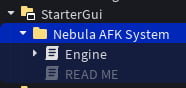
3
Well Done!
The Chat Logs System from Nebula Technologies is now fully working. Anytime a player goes AFK their character will have a glowing transparent effect to show that they are AFK. No further configuration is required, it is now fully working!